
Reviews
2extract Review - Residential Proxies Your Agent Can Drive
We've tested 2extract, a developer-first residential and mobile proxy network with an MCP server that lets an AI agent create and manage proxies for you.

We've tested HTML/CSS to Image, a rendering API for HTML, live URLs and reusable templates, now with a visual editor and a hosted MCP server.
Welcome to this HTML/CSS to Image review ✨
Every product I've built eventually needs to turn something into a picture. A social card for each blog post. A screenshot of a customer's page inside a report. A shareable "you ranked #1 today" graphic. And every time, the same wall: you need a real browser, running somewhere, with the right fonts installed, waiting the right number of milliseconds before it clicks the shutter. Doing that yourself means a Chromium binary in your deploy, a memory ceiling you'll hit on a Tuesday, and a font that renders correctly on your Mac and as Times New Roman in production.
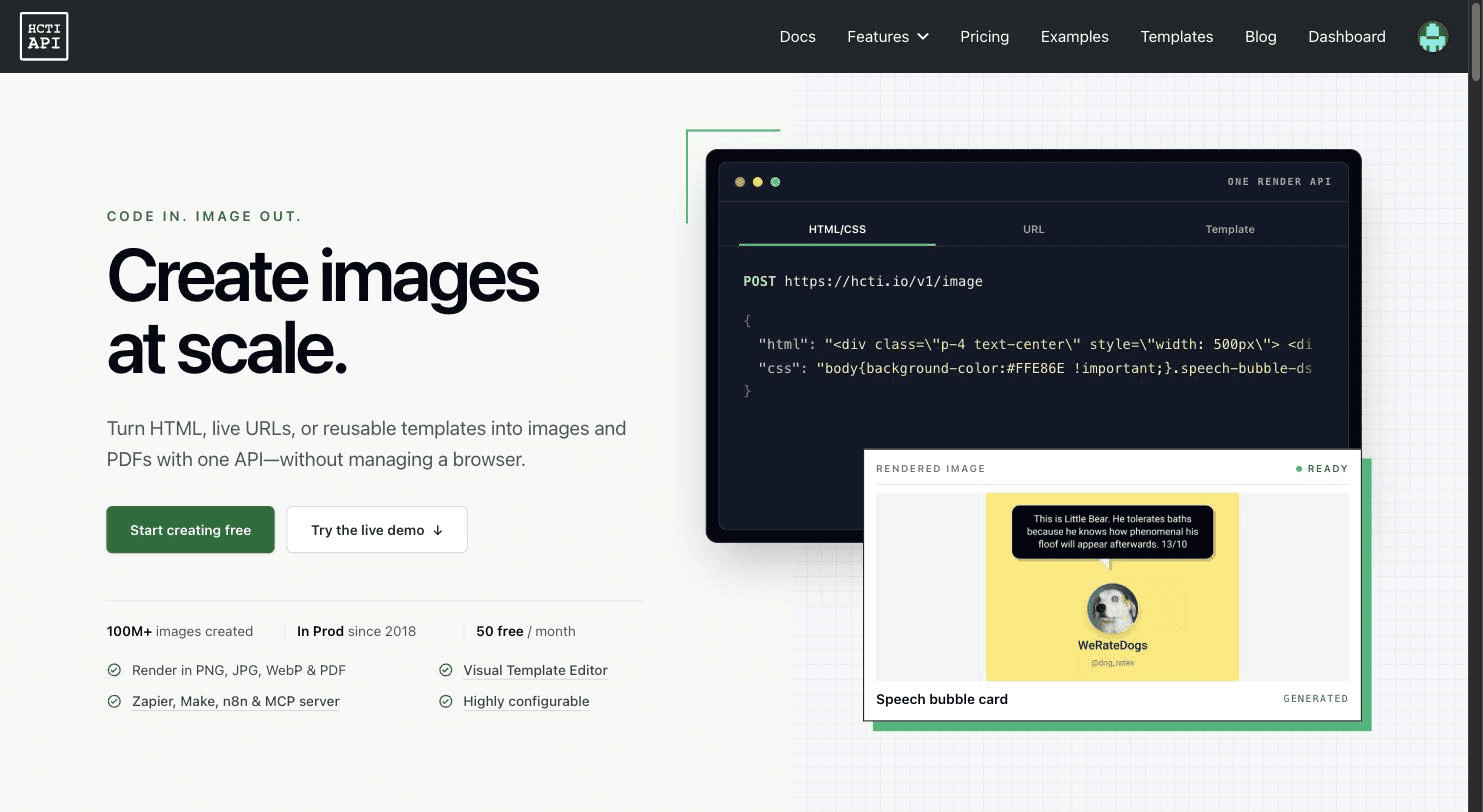
HTML/CSS to Image (HCTI to its users) has been selling the way out of that since 2018. It's run by Code Happy, LLC, and by their own count more than 100 million images have gone through it. You POST HTML and CSS, or a URL, or a saved template plus some values, and you get back a permanent, CDN-cached image URL.
Which means the interesting question for a review in 2026 isn't whether the core works. It's what they've built on top of it. So the founder pointed me at the two newest pieces: the visual Template Editor, and the hosted MCP server that lets an AI assistant render images on your account. I tested both hands-on, plus the html-to-image and URL screenshot endpoints underneath them. I started on the free plan, and part-way through the founder bumped the account to a paid allowance, which is how I was also able to test PDFs, batching and the Open Graph configuration. I'll say which tier each limit belongs to as I go.
Signup is free and the free plan is real: 50 images a month, no card. There's one small wrinkle in onboarding, which is that the "create your organization" box and the "choose your plan" table are a single HTML form, and the organization name is required. So if you tick Select Free, hit Confirm, and nothing happens, that's why. The page just quietly moves focus to the empty name field. I lost a couple of minutes to it before I looked at the DOM.
Once you're through, the dashboard is open and an API key already exists, created the moment you picked a plan. Auth is HTTP Basic: the API ID is the username, the key is the password. The Overview page shows your current billing window (mine read "Sep 10 to Oct 10") against your allowance, plus a historical usage chart you can flip between hourly, daily, monthly and per billing period.
The nicest thing in the dashboard is the Image Console. It's a two-pane editor with HTML, CSS and Options tabs on the left, and on the right three tabs: Live preview, Rendered image, and Sample request. The live preview renders in your own browser, instantly, and costs you nothing. Only when you click Generate image does it hit the API and spend a credit. That distinction sounds small until you're iterating on padding for the twentieth time.
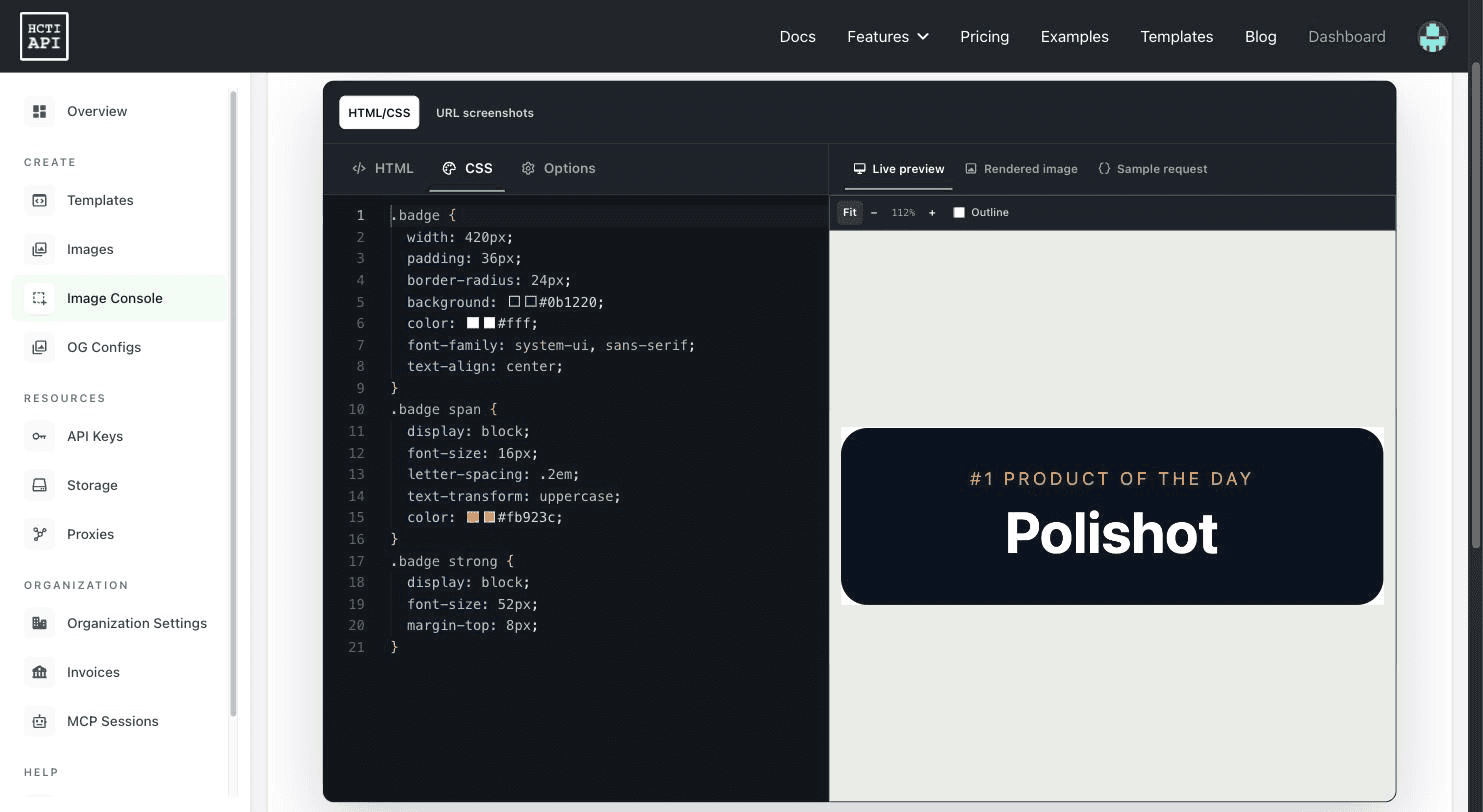
The Options tab is where the real render controls live: light or dark colour scheme, screen or print media type, and a full IANA timezone picker, which matters more than you'd think if your HTML prints a date.
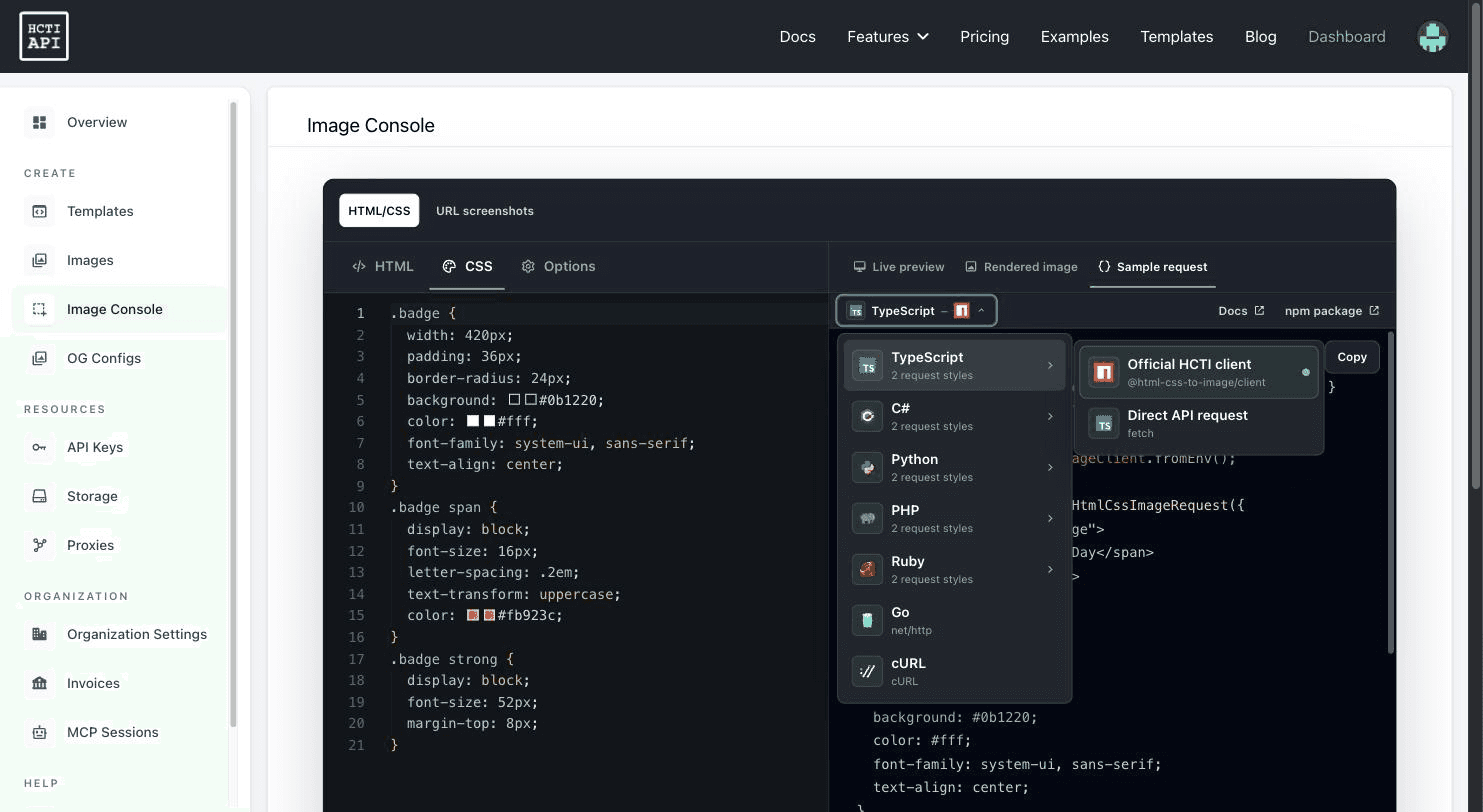
Then the Sample request tab hands you working code for the exact request you just made. The console generates seven languages (TypeScript, C#, Python, PHP, Ruby, Go, cURL), and for five of them you pick a flavour: their official client library, or a direct API call with fetch or the language's equivalent. The TypeScript version came out using HtmlCssToImageClient.fromEnv(), which reads the key from the environment instead of printing it into the snippet.
This is the piece the founder most wanted looked at, and it's the most substantial thing HCTI has shipped in a while. A template is a saved layout with variables; you render it by POSTing values. Previously you built templates by sending HTML with Handlebars placeholders. Now you can build one visually.
The editor gives you eight block types: Text, Image, Shape, raw HTML, and four panels (Free, Flex, Grid, Table). The canvas defaults to 1200 x 640 and there's a searchable preset picker with 29 sizes across three groups: social content, digital ads, and web/product/docs. Each preset carries its dimensions, aspect ratio, a one-line note on when to use it, and a citation for where the number came from. Picking "Open Graph Social Share" set my canvas to 1200 x 630 and labelled it "Cross-platform link preview default for websites and docs. Open Graph standard." That's a level of care I did not expect from a size dropdown.
Backgrounds do solid, gradient (linear, radial or conic, with an angle field and a draggable multi-stop bar) or pattern. Everything updates on the canvas as you type.
The text blocks are where it gets opinionated, and correctly so. There are two kinds, and the palette tells you which is which: a Rich Text Box ("multi-line content with varied typography", tagged HANDLEBARS TEMPLATING) and a Simple Text Box ("single style text with auto-sizing support", tagged DIRECT TEMPLATING). The simple one has Automatically Scale Font Size on by default with a min and a max, which is exactly the feature templated social cards need: your headline is 17 characters one day and 66 the next, and you want it to fit either way rather than clip.
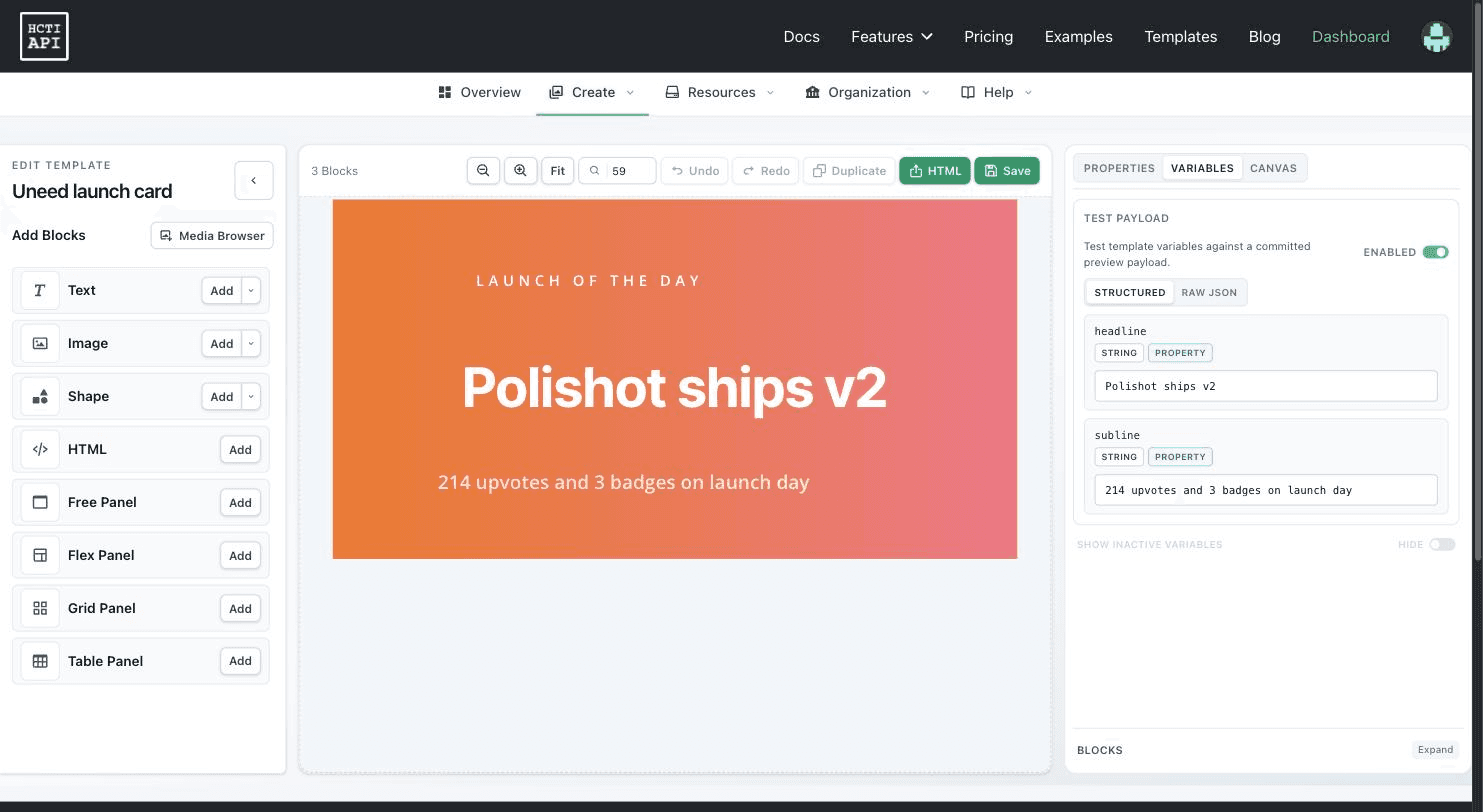
Almost every property in the panel has a small icon next to it, and clicking it turns that property into a template variable. Not just the text content: the font colour, the line height, the letter spacing, the min and max size. And you choose how a missing value behaves, from three options spelled out in plain English:
The variable key accepts dot notation (profile.name), so you can pass a nested object straight through.
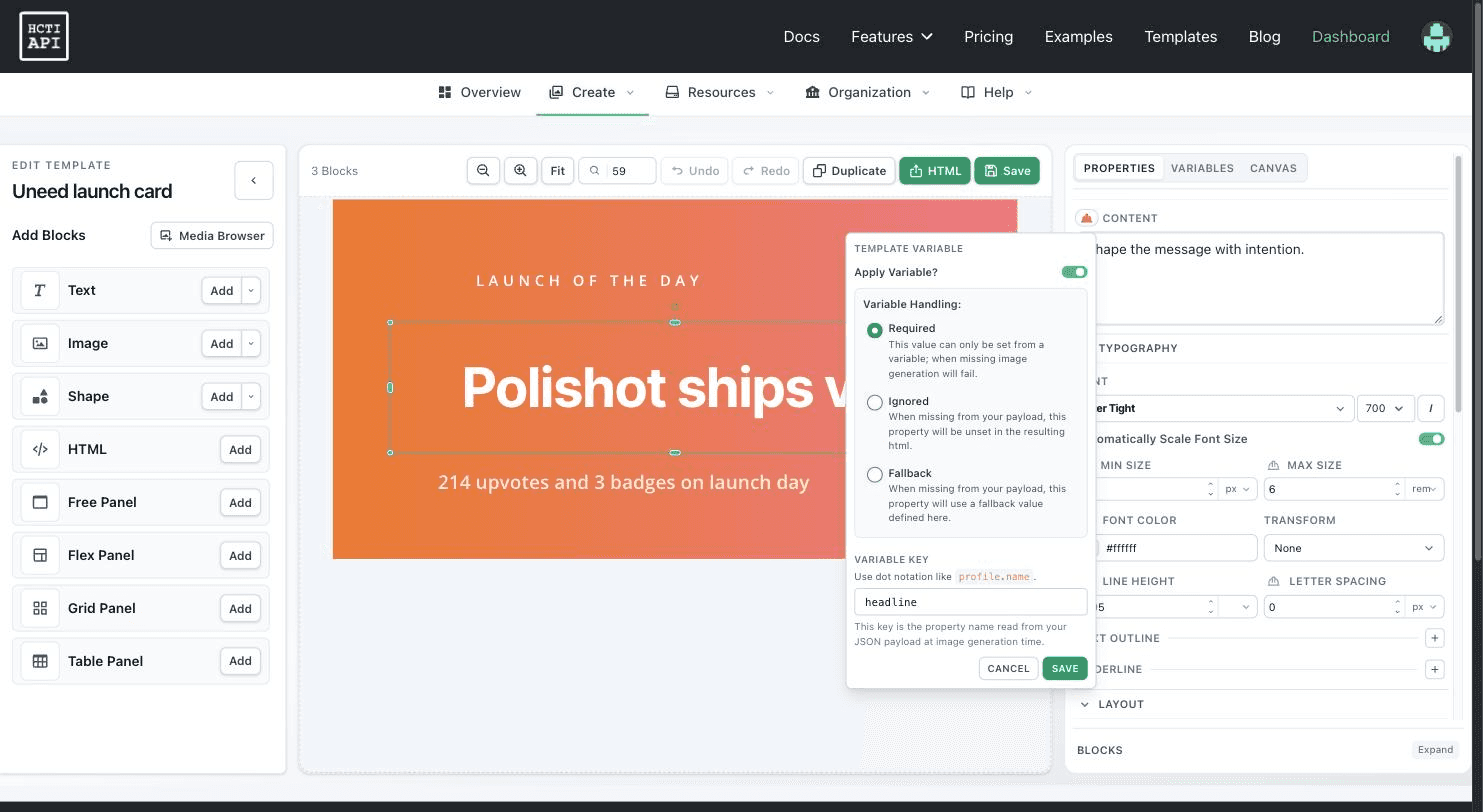
I built an Open Graph card for a Uneed launch: a static eyebrow, a headline bound as Required, and a subline bound as Fallback. The Variables tab then collected both automatically, tagged them (STRING, PROPERTY, ACTIVE) and gave me a test payload panel with a Structured form view and a Raw JSON view showing the exact object I'd send to the API. Flip the ENABLED toggle and the canvas renders with those values. There's a "Pop out" button for the JSON editor and a key/sources table underneath.
Then I saved it and rendered it through the API, and it came back matching the canvas pixel for pixel. That sounds like the minimum bar, but visual editors sitting on top of a headless-browser renderer fail it constantly, and this one didn't.
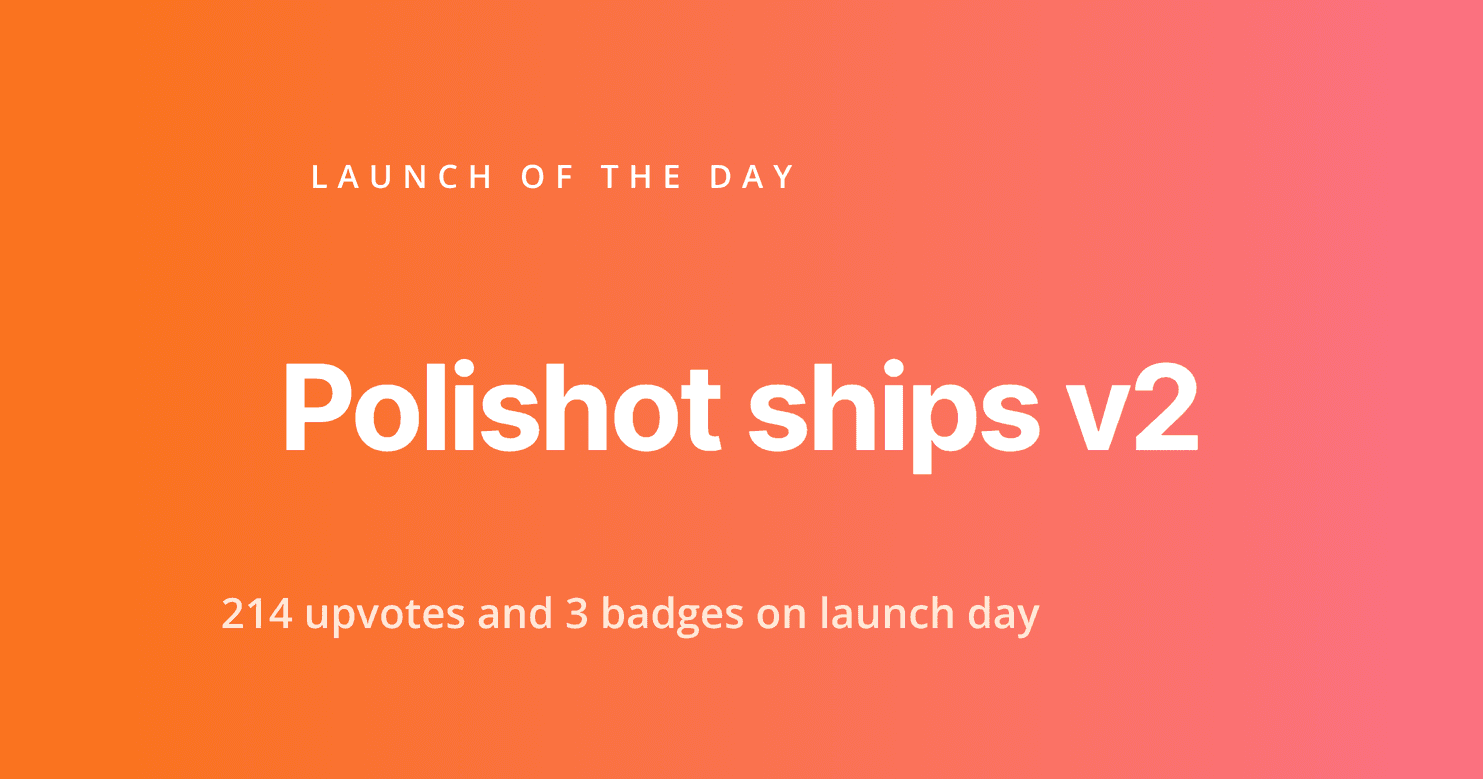
The variable modes are enforced where they should be, on the server. Omitting headline returned 400 with Template value 'headline' is required., and cost no credit. Omitting subline rendered fine and dropped in the editor's own copy. And a deliberately long 66-character headline shrank and wrapped to three lines inside its box, which is auto-scaling doing its job.
Two honest notes. First, the font picker sets each family name in its own typeface, which is lovely, except the names are invisible until each preview font finishes loading, so on first open you get a column of weight ranges (400, 400-700, 100-900) and nothing else. Typing a name filters and renders correctly. Second, editor templates are stored as blocks, not markup: GET /v1/template returns template_type: "blocks" with a block_counts object and a structured variables array, and the html and css fields come back empty. Storing structure rather than a flattened string is the sane choice, but if you have code reading markup out of that endpoint, editor templates will look blank to it.
The other thing the founder asked me to try, and the part I found most quietly impressive.
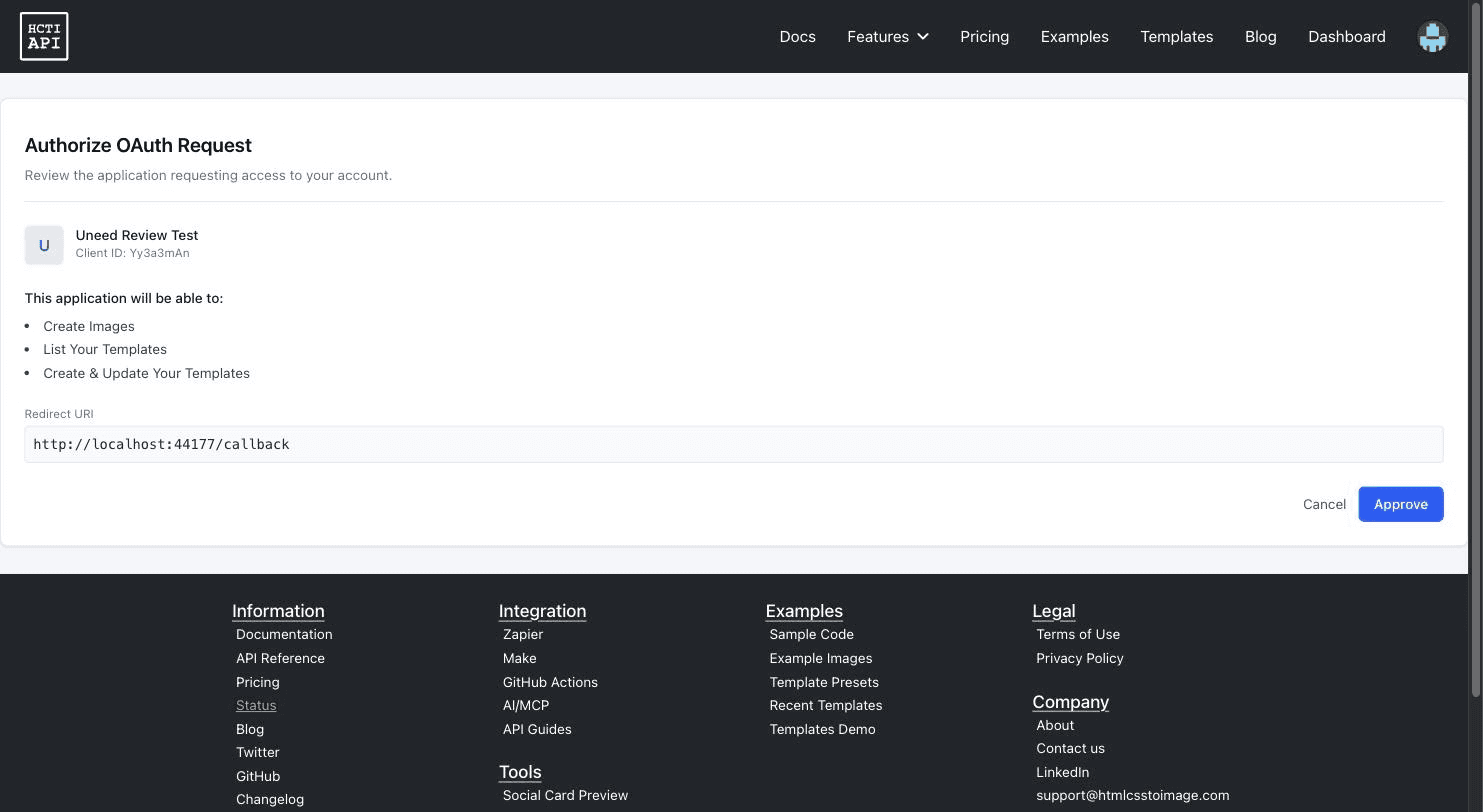
The server lives at mcp.hcti.io over Streamable HTTP, and it does OAuth properly: dynamic client registration, PKCE with S256, three declared scopes (image:create, template:read, template:create). I registered a client and walked the flow by hand to see what it actually does, and the consent screen is the payoff. It names the client, shows the client ID and redirect URI, and translates the scopes into three lines a human can read: "Create Images", "List Your Templates", "Create & Update Your Templates". No API key gets pasted into an assistant, and the token I got back was good for 12 hours with a refresh token alongside it.
Connected, the server identifies itself as "HTML/CSS to Image API" v1.0.2 and exposes 12 tools, 5 documentation resources (layout recipes, image authoring, parameter decisions, template authoring, troubleshooting) and 5 prompts. Alongside the render tools (create_image, create_url_image, create_templated_image, create_batch_images) there are the management ones (create_template, update_template, list_templates, list_template_versions, list_storage_destinations, list_proxies) and, sensibly, check_usage and get_max_batch_size.
check_usage is the one to run first, because it proves the connection without spending anything. Mine returned {"images_used": 2, "images_allowed": 50, "overages_enabled": false, "next_reset": "2026-10-10T12:33:03Z"} as structured content, not prose an assistant has to parse.
What sold me, though, was the writing. The server ships 1,459 characters of instructions to the client, and they read like someone who has actually watched agents misuse an image API. Call get_max_batch_size before building a batch. Resolve a template by name through list_templates and ask the user when no candidate is unambiguous. Leave include_image_data off unless a preview is genuinely needed. And this, which I've not seen a vendor say out loud: when inline image data comes back, inspect it for clipping, overflow, stray whitespace and illegible text, and if it's visibly wrong, fix the HTML and render again.
The error messages are built the same way. Calling list_templates without arguments returns "Missing required argument 'count'. Call 'list_templates' again with a top-level 'count' value matching the tool's input schema." Plan gates come back as real refusals with reasons: get_max_batch_size on the free plan returned "This plan does not support batch create", and list_proxies returned "Your plan does not support proxies." An agent can act on all of that without a human in the loop.
I rendered both a card and a URL screenshot through MCP end to end. Each call returned in about 0.6 seconds with a markdown image link ready to paste, and the template listing came back with the full variables array including each mode, so an assistant can inspect a template's contract before rendering it. Install instructions are published for 11 clients, from Claude and Codex through Cursor, VS Code, Zed and JetBrains, plus Zapier and Pipedream. And the dashboard has an MCP Sessions page listing every grant with its client name, redirect URIs, and the IP, location and user agent captured at both registration and approval, each with a Disable button. For a credential that lets an AI spend your image quota, being able to see who claimed it and from where matters more than it would for a normal API key.
To see the whole thing behave, I wired the server into Claude Code (one claude mcp add --transport http line, project-scoped) and asked in plain English for a 1200x630 launch card with a gradient and an eyebrow. It came back with a hosted URL in one turn, and the interesting part is what I never specified: it chose selector to crop to the fixed-size element and loaded Inter through google_fonts on its own, because the tool schema tells it to give a fixed-size render an explicit element and the instructions tell it to request only the fonts the markup uses. That's the difference between an MCP server that exposes an API and one that has been taught how the API should be used.
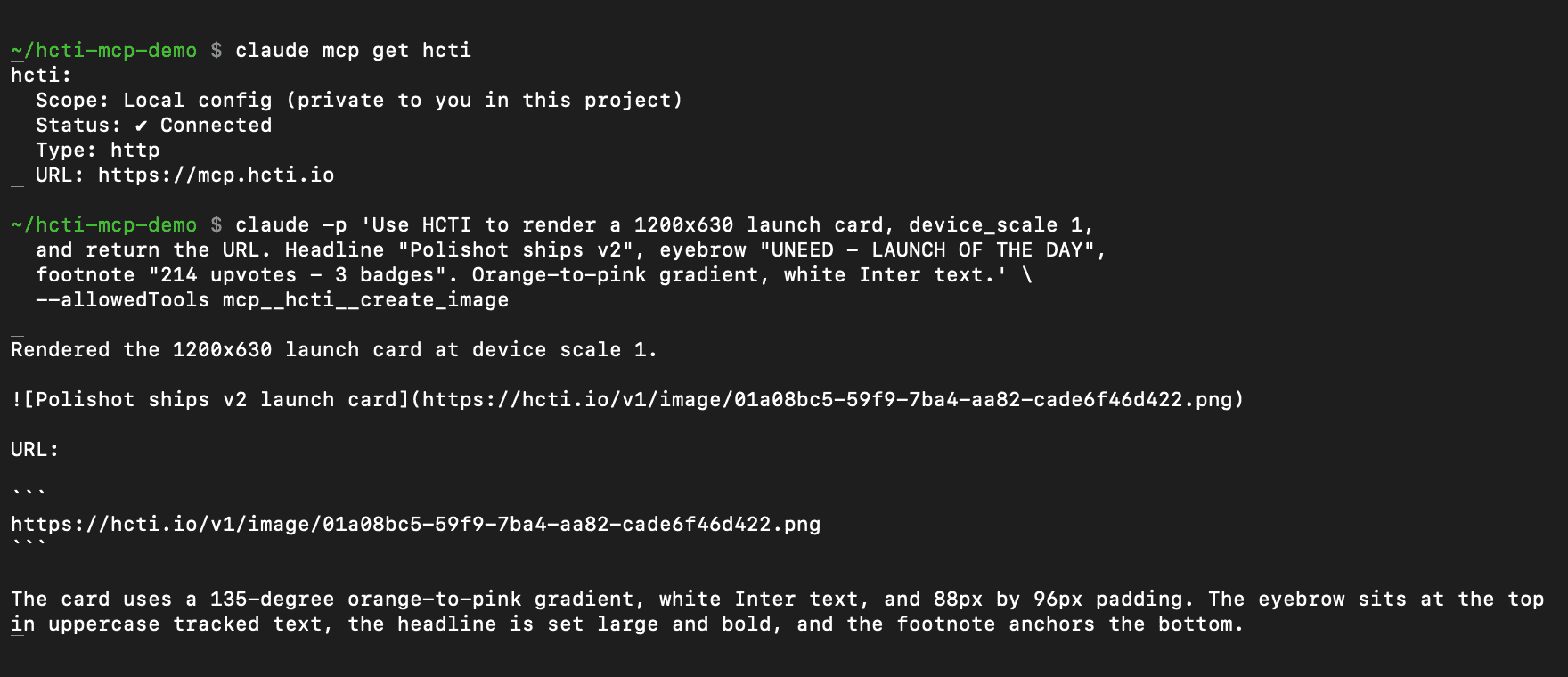
One gap worth naming: the tool arguments nest under a content object, and the example prompts in the docs read as though the parameters are flat. An assistant recovers instantly from the error message, but anyone hand-writing a client will guess wrong first.
This is the feature that answers "I have 400 blog posts and none of them have a card." You add one og:image URL pattern containing the page path, HCTI opens that page, reads its meta tags, and returns the right image, cached until the inputs change.
The configuration screen is more considered than I expected. You give the config a name and a website origin (secure origin only, no path), and there are two checkboxes: whether the config is enabled at all, and whether HCTI should parse hcti: and html:tv: meta tags from each requested path. Then a slider for how long HCTI may reuse its last metadata check before asking the page again, from a 30-minute minimum to a year, with a note that your own origin cache headers can extend it. There's a collapsed "Authentication and redirects" panel for pages behind a token or cookie. And then the choice that matters: Page Screenshot, which captures the page at the requested path with a page-only CSS override you can apply just before capture, or Template Values, which reads values from the page and drops them into a template you already designed, with an explicit "map page metadata to template fields" table.
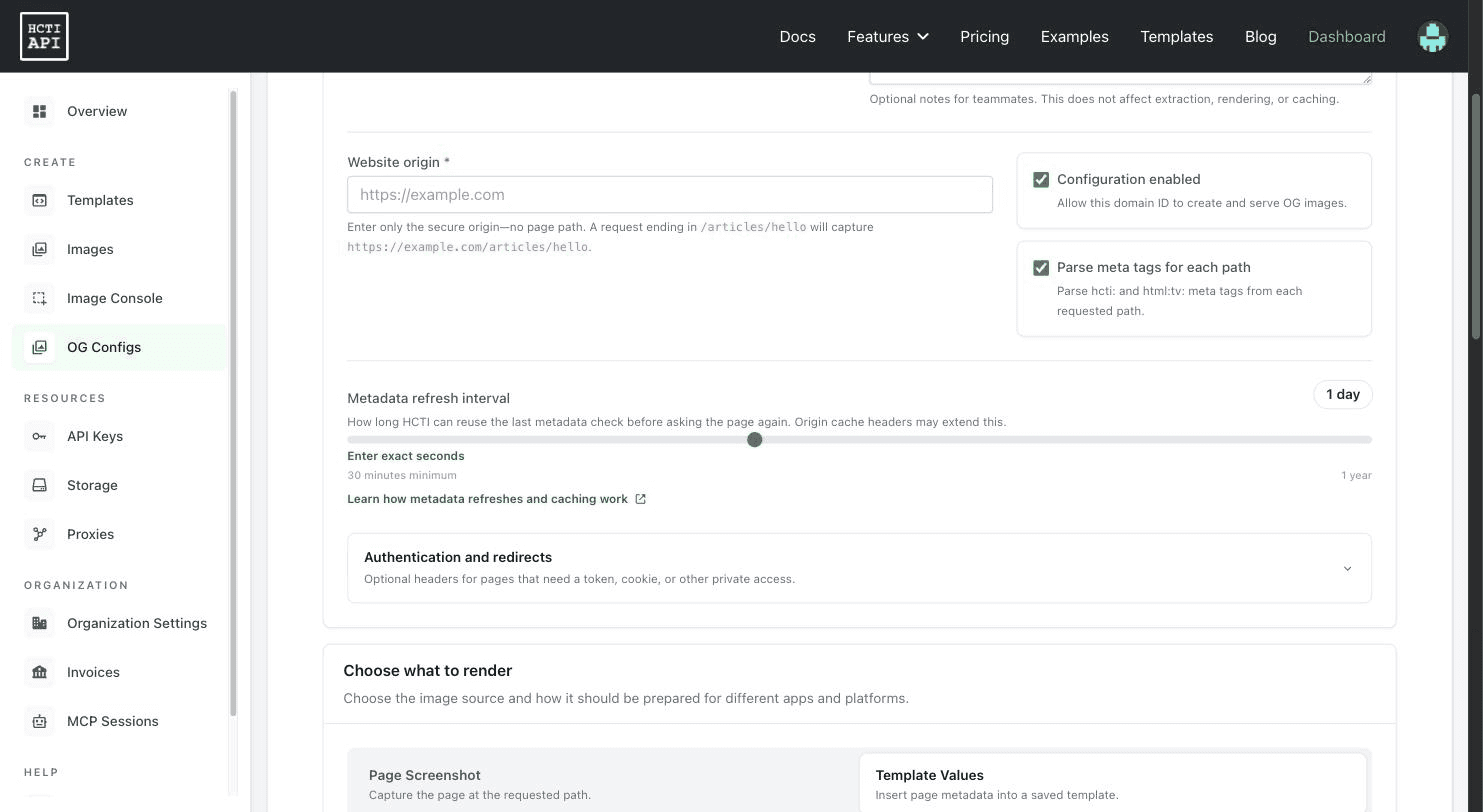
The split is the useful part: the layout lives in one place you maintain, and each page supplies only its own values. I walked the whole configuration through but stopped short of pointing a live site's og:image at it, since that means editing the head of a production page, so I can't personally vouch for the refresh-and-reuse behaviour over days. Everything up to that point is exactly what you'd want.
The free companion to it is worth knowing about even if you never sign up: the Social Card Previewer, no account needed. Paste a public URL, pick one of 17 platforms, and it renders the unfurl inside a mock of that app while auditing the tags. I ran the DATA HIT review from this blog through it as Slack: it drew the card inside a fake #product-launches channel, then flagged the title at 54 characters as "Good length for most previews" and the description at 161 characters in amber with "Some platforms may shorten this. Aim for 160 characters or fewer." It counted 11 metadata tags and offered the full report. That's a better OG debugger than most of the standalone ones.

Under all of it sits the original API, and it is fast and unfussy. POST https://hcti.io/v1/image with html and css, or with url, and you get back an id and a permanent URL. Every POST I made returned in 0.5 to 0.9 seconds; the render itself happens on the first GET, which took 1.1 seconds for a card and 4.5 seconds for a URL screenshot. Output is PNG by default, and you switch to JPG, WebP or PDF just by changing the extension on the URL you already have.
The defaults are chosen well. HTML and template renders use a device scale of 2, so my 1200 x 630 card came back as a 2400 x 1260 file ready for retina, while URL screenshots use a scale of 1, because you asked for a screenshot of a page and not a poster. Google Fonts load with a single google_fonts parameter and my DM Serif Display headline came out correct; emoji render in full colour through Twemoji unless you turn it off.
I captured Uneed's own pricing page at 1440 x 900, a JavaScript-driven Nuxt page, and it came back accurate down to the chat bubble in the corner, so the wait-for-load logic is doing real work. When it isn't enough there are the usual levers plus one I like: render_when_ready, which waits for the page to call ScreenshotReady() itself. selector crops to a CSS selector, block_consent_banners kills cookie walls, and full_screen takes the whole scroll height.
The feature I'd not have thought to look for is deduplication. I sent the same html and css three times and got the same image id back each time. The usage endpoint confirmed it: three POSTs, two credits. On the free and Basic plans the reuse window is up to a month, Pro lets you choose up to six, Scale up to a year.
That window is the whole cost model if you generate OG images lazily. Say 500 posts and 60,000 monthly page views, with the card rendered on request: without dedup you bill 60,000 renders and need the $249 Pro tier, and with a one-month window you bill roughly 500 and the $14 Basic tier covers it. Same code, one parameter apart.
Resizing and cropping also work off the finished URL rather than through a re-render, which means changing your mind about a crop costs nothing.
PDFs are the same endpoint with format: "pdf", and they're real vector PDFs rather than an image in a wrapper. I rendered an invoice table at A4 with 20mm margins and printed backgrounds and got back a 34 KB one-page PDF with the table borders and header fill intact. One warning from my own mistake: pdf_options takes page_width, page_height and a four-value margins array, and if you invent plausible-sounding keys instead (I tried page_size and a single margin string) the API returns 200 and silently applies the defaults rather than telling you the keys are wrong. Check your first PDF against a ruler.
Batching is POST /v1/image/batch with a default_options object plus a variations array that overrides it per image. Three cards sharing a stylesheet came back in one request in 2.0 seconds. The ceiling is 25 on Basic and Pro, 100 on Scale.
GET /v1/usage rolled up by hour, day, month and billing period, GET /v1/images with pagination, and DELETE on an image id that clears the CDN with it.llms.txt, both current, which is the tell of a team that expects machines to read their site.Prices are in USD, billed monthly, and each tier has a volume dropdown that scales the price.
| Plan | From | Images / month | Batch | Dedup window |
|---|---|---|---|---|
| Free | $0 | 50 | Not included | Up to 1 month |
| Basic | $14 | 1,000 ($14), 3,000 ($29), 10,000 ($69) | 25 | Up to 1 month |
| Pro | $149 | 30,000 ($149), 65,000 ($249), 100,000 ($375) | 25 | Up to 6 months |
| Scale | $749 | 200,000 ($749) up to 1,000,000 ($3,000) | 100 | Up to 1 year |
Overages are optional on paid plans at $10 per 1,000 images, or $50 per 10,000 on Scale, so you keep rendering past your limit instead of returning broken images to users. PDFs, dynamic OG images and unlimited image retention start at Basic. S3 storage and proxies unlock from 10,000 images/month. Longer render timeouts, 50 seconds instead of 30, are Scale only. Enterprise is a conversation, with a 99.95% uptime SLA and invoice billing.
The free tier deserves a caveat, because it's generous in the dimension people check and narrow in the ones they don't. 50 images a month is plenty to prototype with, and the API, the Template Editor and the MCP server all work on it. But PDFs, batching, OG configs and media uploads in the editor are all gated, and I hit each of those walls before the account was upgraded: batching answers 401 with "This plan does not support batch create", proxies 403 with "Your plan does not support proxies", and a pdf_options request comes back as a field-level validation error saying the plan cannot generate PDFs. Clear refusals rather than mysterious failures, though see the note below about which status code carries them. Either way, treat the free plan as a trial of the rendering rather than of the product.
While probing it I did find one piece of stale documentation: the templates page states that free plans can create one template and paid plans 1,000. The live limit is five, and the API says so clearly when you hit it ("The tryit plan is limited to 5 templates"), which matches the pricing page. Worth flagging because if you read the docs first you'll assume you have less room than you do. The API also now requires a template to contain at least one Handlebars placeholder, which the docs don't mention.
Who shouldn't bother: if you need one image, make it in Figma. If your image generation lives entirely inside a Next.js app, @vercel/og is free and in-process, and HCTI's advantage only shows up once you want templates, screenshots, PDFs and caching from the same place. And on positioning: HCTI sits deliberately between the screenshot-only APIs like Urlbox and ScreenshotOne, which don't do templated graphics, and the design-first templated-image products like Bannerbear and Placid, which are less interested in being a general rendering primitive. HCTI is an API with a visual editor bolted on, not a design tool with an API bolted on. If you want brand-managed graphics with a drag-and-drop-first workflow, the design-first tools will feel more natural. If you want one endpoint that renders anything a browser can render, HCTI is built for that job and priced for it.
That's the end of this HTML/CSS to Image review. Eight years in, the core is exactly as boring as it should be: fast, well-documented, predictable, with defaults that are already what you'd have chosen. What's new is more interesting than "we added an editor". The Template Editor is a properly thought-out variable system with three explicit missing-value behaviours and a test payload you can see, and the MCP server is one of the better-written ones I've connected to, with a consent screen a non-developer can read and an audit page for every grant.
What I liked:
Things to keep in mind:
content object, which the documented example prompts don't show.401 and the message "This plan does not support batch create", while proxies correctly returned 403. A 401 reads as bad credentials, so the first thing a client will do is go and check its API key.pdf_options keys are accepted with a 200 and silently ignored, so a wrong page size or margin looks like it worked.If you're generating images from a server and you've been putting off the browser problem, HTML/CSS to Image is the well-built way to make it stop being your problem.


